


Introduction
Almost every renovation project starts with a deadline promised to the client and ends with an awkward conversation about why it wasn't met. Somewhere in between there is usually a schedule drawn up in Excel on day one, printed once, and never touched again. When the plumber can't get in because the tiling is running late, nobody recalculates anything: the dates just get pushed around in the site manager's head and everyone crosses their fingers.
The problem isn't a lack of a plan. It's that the plan isn't alive. A schedule that doesn't understand which task depends on which, that doesn't know who's available that week, and that doesn't reorganise itself when something moves, is a dead document. In this article we look at how to plan a renovation with a real Gantt chart —dependencies, critical path, milestones— and how tools like Tabiquo turn that plan into something that updates itself instead of going stale by week one.
Why an Excel schedule isn't enough
Excel is great at listing tasks. It's terrible at understanding relationships between them. On a renovation, tasks aren't independent: you can't paint before plastering, you can't tile before the plumbing rough-in is done, you can't lay flooring before the substrate is level and dry.
Those relationships are called dependencies, and they're the heart of any serious schedule. Without them, moving a date is a manual chore: if demolition slips three days, someone has to remember that this pushes the rough-in, the tiling, the painting and the handover. In Excel that recalculation simply doesn't exist; you do it by hand or you don't do it at all.
The real cost of poor planning
A badly planned job doesn't show on day one. It shows when two trades collide in a space that can't hold both, when a material arrives before there's anywhere to put it, or when you discover in week 6 that the handover date was impossible from the start. Each of those failures costs money: idle crew hours, late-delivery penalties, and the most expensive erosion of all —the client's trust.
Anatomy of a proper Gantt chart
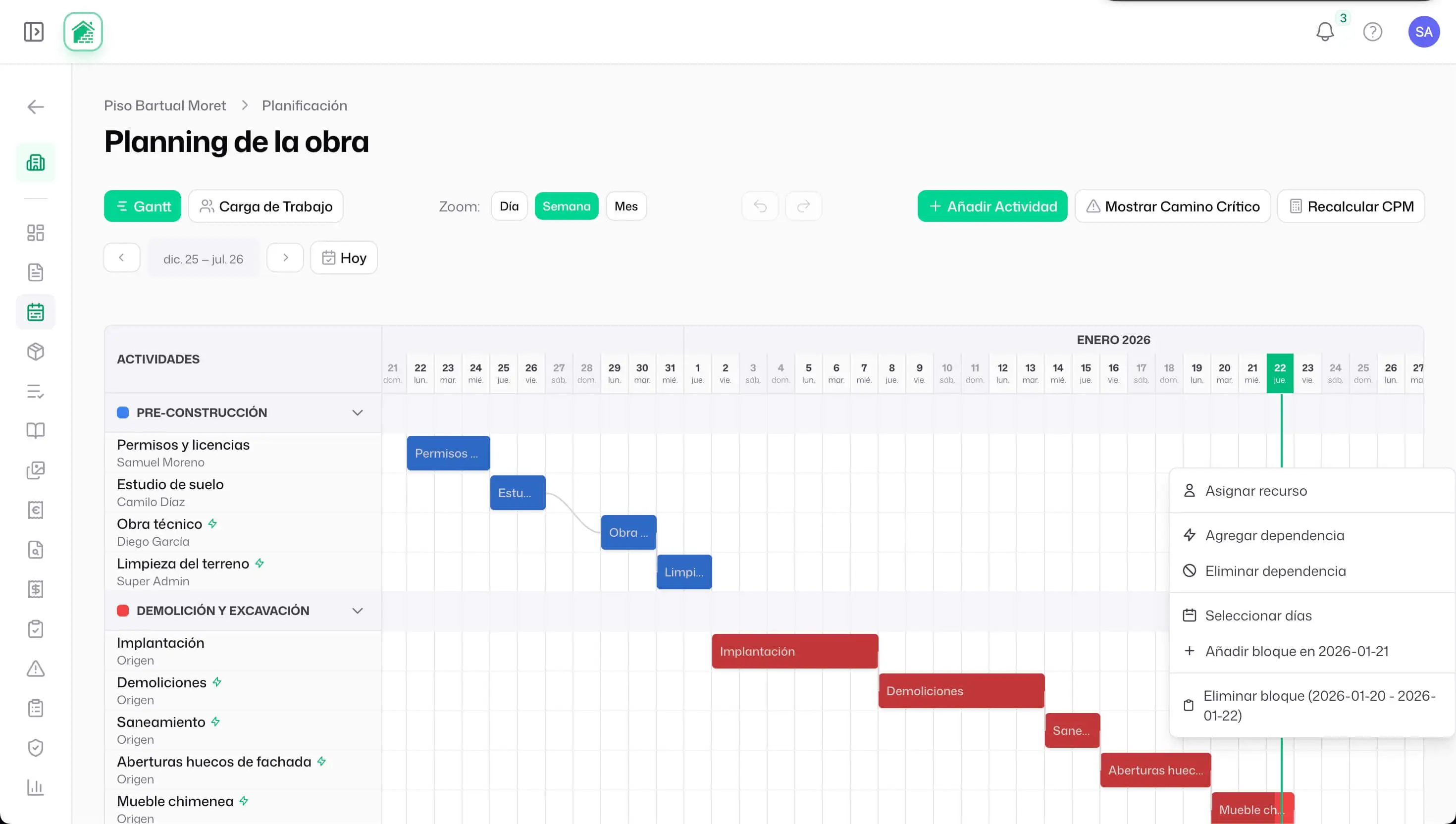
A Gantt chart represents each task as a horizontal bar on a timeline. Its length is the duration; its position, the dates. Any template gets you that far. What separates a useful Gantt from a pretty drawing are four elements.
1. Task dependencies
A dependency says "this task can't start until that one finishes." On a real renovation, a single task often has several predecessors: tiling the bathroom depends on both the plumbing and the embedded electrical being done. That's why in Tabiquo dependencies are modelled with support for multiple predecessors —not a single link— through a dedicated relationships table. When you draw an arrow between two tasks, the system understands the full chain.
2. The critical path
Of all the chains of dependent tasks, one is the longest: the one that determines the project's finish date. That's the critical path. Tasks on it have no slack —if one slips a day, the whole project slips a day. Tasks off it have float and can move without affecting the deadline.
Knowing which tasks are critical changes how you manage: you stop treating everything as urgent and focus attention where it actually matters. Tabiquo calculates the critical path automatically (CPM algorithm) and recalculates it every time you change a duration or a dependency, highlighting critical tasks so you can see at a glance where you can't afford a failure.
3. Milestones
A milestone is a zero-duration point: "end of demolition phase," "kitchen delivery," "client walkthrough." They're drawn as a diamond instead of a bar. They serve as checkpoints and as a communication tool with the client: instead of explaining 40 tasks, you show the 5 milestones they care about.
4. Phases and summaries
Tasks are grouped into phases (demolition, MEP, finishes…). In Tabiquo, each phase's header row shows a summary bar that aggregates the date range and progress of all its tasks. So you can collapse the detail for a bird's-eye view of the job, or expand a specific phase when you need the day-by-day breakdown.
The schedule that reorganises itself
This is the real difference between a living plan and a dead one. In Tabiquo, when you drag a task or change its duration on the Gantt, the system automatically reschedules the successor tasks while respecting dependencies. If demolition runs two days long, the rough-in that depended on it shifts by itself, and so does everything behind it.
And it doesn't shift blindly: the new dates respect working days. The system skips weekends and team holidays when computing the new dates, because pushing a task "two days" means nothing if those two days land on a Saturday and Sunday. This combination —dependency recalculation + working-day snapping— is what turns a single delay into a realistic new handover date in seconds, instead of an Excel sheet you're lying to your client with.
People, not just bars: assignment and availability
A schedule that doesn't know who does what is half a plan. On a renovation, a task can be executed by one or several in-house workers, one or several subcontractors, or a mix of both.
Multiple assignees
Tabiquo lets you assign several people to a task at once —workers and subcontractors combined— instead of forcing you to pick one. Tiling can go to two operatives; the electrical install, to a subcontractor. In the Gantt sidebar you see who's assigned to each task at a glance.
Conflict detection
This is where planning stops being a drawing and starts protecting you. When you assign someone to a task, Tabiquo checks whether that person is already assigned to another job or task on the same dates and warns you of the overlap conflict before it becomes a problem on site. The detector also understands capacity: an operative with one light task isn't the same as one juggling five at once.
Real crew availability
The system cross-references assignments with each worker's approved leave and with team holidays. If you try to schedule someone during the week they're off, you'll know. And when someone isn't available, Tabiquo can suggest replacement workers with the right profile, instead of leaving you with an open gap.
Plan types: there isn't just one schedule
A project doesn't have a single schedule. It has the one you signed with the client and the one you're actually executing. Tabiquo distinguishes several plan types for the same project:
- Contractual: what you agreed with the client, untouchable as a reference.
- Executive: the operational plan the site works to.
- Updated: the version that reflects reality as of today.
- Lookahead: the short-term plan (the next 2–3 weeks) the site manager and foremen use.
- Recovery: the plan you build when an accumulated delay has to be clawed back.
- Safety: the plan tied to safety measures.
Each plan also moves through its own status workflow (draft → sent → accepted / rejected), so the plan you send the client is recorded once they approve it.
Measuring delay: baselines and variance
If all you have is the current schedule, you'll never know how far you've drifted, because the reference moves with you. That's why you need a baseline: a frozen snapshot of the plan at a point in time.
Tabiquo lets you create baselines with a label and save them. Then you can overlay the baseline on the current Gantt and see, task by task, where you're ahead and where you're behind what you promised. The variance calculation gives you the objective figure —"we're 6 days behind the contractual baseline"— that you need both to make decisions and to have an honest, documented conversation with the client.
Recurring tasks and daily logs
Not everything on a job is a one-off task. End-of-day cleanup, the safety check, the daily log… are recurring tasks. Tabiquo automatically generates the instances of tasks that repeat (daily, weekly, fortnightly, monthly, or on specific weekdays), so you don't have to create them one by one by hand.
On top of that, each task can require completion proof: none, optional photo, mandatory photo, mandatory signature, or photo and signature. So when a worker marks a terrace waterproofing as done, the system asks for the photo that proves it before closing it. The plan stops being a promise and starts carrying evidence.
From office to site: web and mobile
The plan is built from the admin panel —where the site manager draws the Gantt, creates dependencies and assigns crews— but it's consumed on mobile. Each worker opens the app and sees their assigned tasks with their dates, without having to decipher an entire Gantt. When they're done, they mark the task and attach the proof straight from their phone.
To speed up creation, Tabiquo includes a natural-language task parser: you type "tile the main bathroom next Monday and Tuesday, 2 operatives" and the system proposes the structured task with dates and assignment. And when you need to share the schedule outside the system —with the client, with the project supervisor— you can export the Gantt to PDF for whatever date range you choose.
Conclusion
Planning a project isn't drawing pretty bars on day one. It's building a living model of the job that understands what depends on what, knows who's available, and reorganises itself when reality changes —because reality always changes. A Gantt with dependencies and a critical path tells you where the risk is; automatic recalculation and working-day snapping turn a surprise into a realistic new date; baselines let you measure delay with data instead of gut feel; and conflict detection plus crew availability head off clashes before they happen.
Tabiquo brings all of that together in one place: planning with multiple dependencies and milestones, automatic critical path, multi-assignee crews with overlap control, baselines with variance, recurring tasks with completion proof and PDF export, all connected to the mobile app your workers use every day. If your schedule still lives in an Excel sheet nobody updates, it might be time to bring it to life.