


Introduction
The visit takes twenty minutes. The estimate gets written at night: photos buried in the camera roll between yesterday's job and your kid's birthday, measurements on the back of a delivery note, and half of what the client said left to memory. Four visits in a week means the fourth estimate goes out the following Monday. And in renovation, the first estimate to land is very often the one that gets signed.
A few weeks ago a renovation company trying Tabiquo sent us a sentence that sums up the problem better than any market study. They wanted to log the visit that comes before the estimate, even when there is no project or estimate yet, save everything from the phone — video, photos, measurements, notes — and find all of it again when it was time to write the estimate.
They were right, and it's a request most construction management software doesn't handle, because most of it starts counting from the moment a project exists. The sales visit happens outside the system: in the owner's WhatsApp, in a notebook. This article covers what a good site visit for a quote should capture, where the information leaks on the way to the office, and how we built "Visit for an estimate" in Tabiquo so that the visit ends with half the estimate already done.
What a site visit for a quote should leave you with
With or without software, a visit that is going to become an estimate should give you:
- The rooms, one by one. Not "kitchen and bathroom refurb", but kitchen, main bathroom, guest WC, hallway. Estimates are organised in chapters and line items, and line items are thought out room by room.
- Each room's measurements. Width, length and height at the very least; the square metres follow. Anything that isn't a room dimension — twelve metres of skirting, a 120 × 140 window — too, even if only as a note.
- Photos of what matters, attached to their room: the soil stack that has to move, the consumer unit, the damp patch under the window. A photo with no room and no date is worth half as much.
- A walk-through video, which tells you in two minutes what ten photos can't: how the spaces connect, how materials get in, whether there's a lift.
- What the client asked for, in their words. "Walk-in shower, flush with the floor." "I want to keep the original tiles in the hallway." That is exactly what gets argued about later.
- The usual questions: is there a lift? Does this need a permit or just a notification? Does the building's management have to be told? Where can the skip go?
- The documents still missing: cadastral plan, land registry extract, earlier building permits. The client rarely has them to hand, and someone has to remember to get them.
- The client's contact details and the exact address, so you can send the estimate without calling to ask.
If your visit leaves you all of this, the estimate is office work. If not, it's memory work — and memory at eleven at night makes mistakes.
Where the information leaks
Between the front door and the van
The problem with the traditional visit isn't missing data. It's scattered data. Photos go to the camera roll, measurements to a scrap of paper, what the client said to a voice note you send yourself on WhatsApp, and the video — if you shot one — somewhere else again. Nothing is linked to anything. At night, working out which photo belongs to which bathroom is half the job.
Between the person who visits and the person who prices
In many firms, the person who goes to the visit isn't the one who writes the estimate. Now the problem doubles: what the salesperson or site manager saw has to reach the office, and it arrives however it arrives. The office asks, the visitor doesn't remember, and someone calls the client back to ask for the bathroom measurements again.
Between the visit and the system
Even when the firm uses management software, the visit usually stays outside it, because the software wants a project first: name, address, a full client record, sometimes even a start date. Nobody fills that in on the doorstep of a client who hasn't said yes yet. So the visit happens "outside" and gets copied "inside" later… or never.
On the doorstep: start with a name
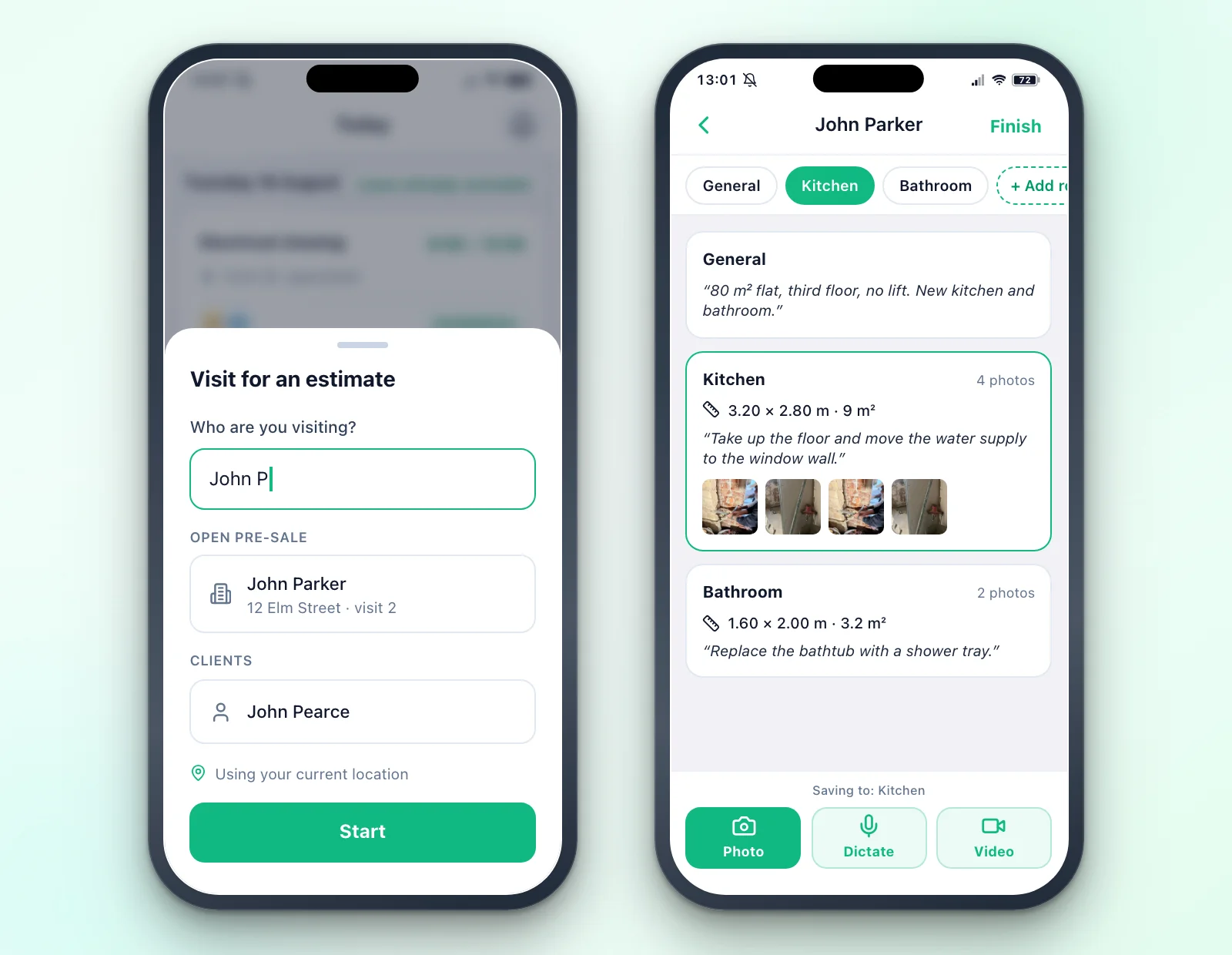
In Tabiquo, the visit for an estimate starts from the app's home screen with a single piece of information: the client's name. "Who are you visiting?" Type "John Parker", tap Start, and you're already capturing. No project to create first, no client record to fill in, no dates to pick.
Behind the scenes, Tabiquo creates the client, a project in Pre-sale status and the visit in one operation. Your location is taken quietly from the phone if you allow it; a written address isn't required and shows up as a gentle reminder, "Add site address", never as a blocker. As you type the name, the app suggests open pre-sale projects first — so a second visit to the same client joins the same pre-sale instead of creating another — and then your existing clients.
Room by room
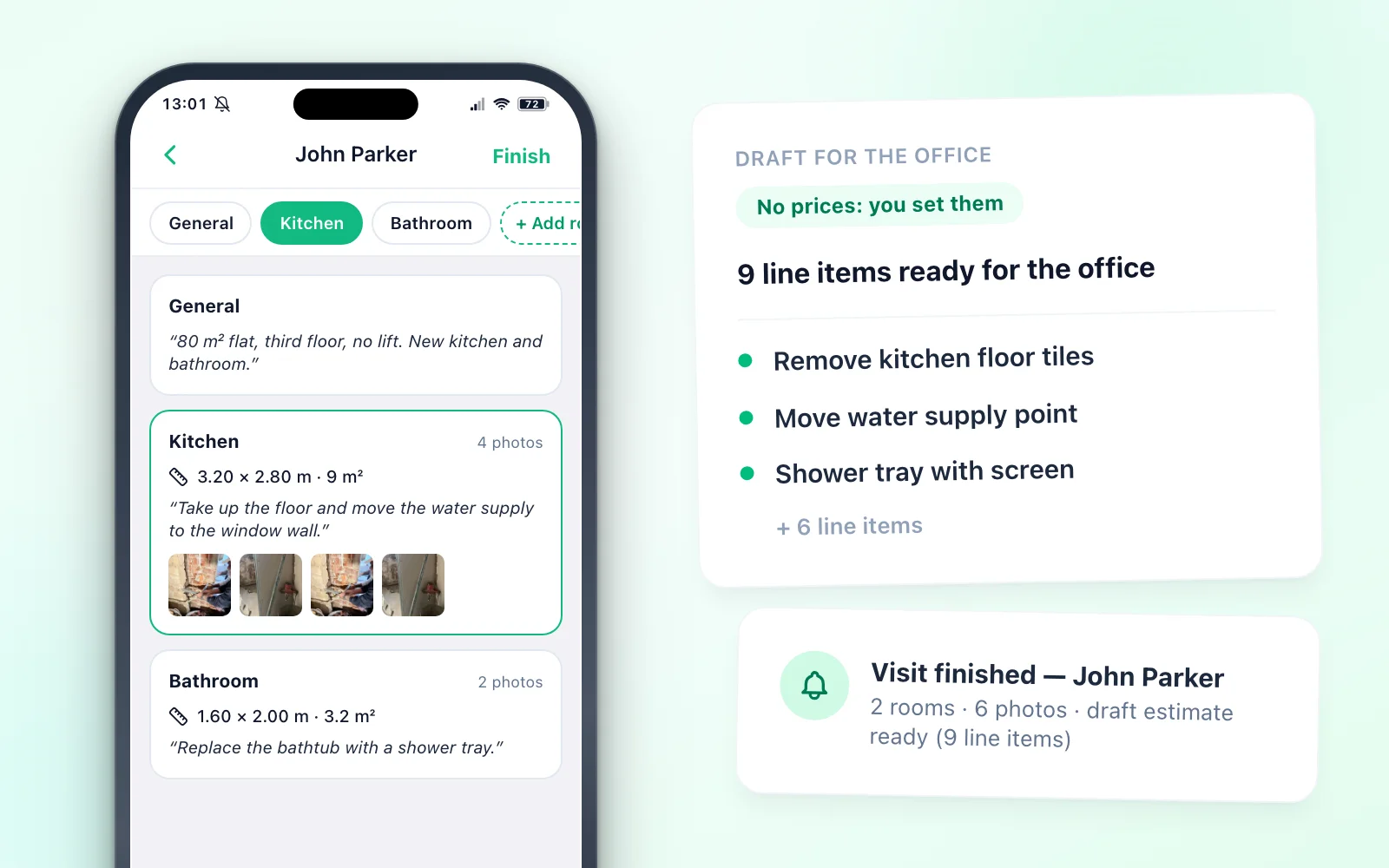
Across the top of the screen runs a strip of rooms: "General" plus one per room of the house. Whichever one is selected is where the next capture goes. To add a room, tap "Add room" and type "Kitchen": the name is enough. No room type, no floor area, no form. If you never measure it, it simply shows "Not measured" and nobody is blocked.
At the bottom, within thumb's reach, sit the three capture buttons: Photo, Dictate and Video.
- Photo opens a camera that stays open: shoot ten times, close once. Each shot uploads on its own in the background, with the time and GPS position it was taken at. That location data stays inside your team: it never appears in anything the client sees.
- Video records up to two minutes: the walk-through, from the entrance to the last room.
- Dictate records up to five minutes of speech.
Speak instead of typing
Dictation is the biggest time saver, because it's how you'd talk anyway. If you're in the kitchen and say "take up the floor and move the water supply to the window wall", the note lands in the kitchen. If you're on "General" and say it all in one go — "the kitchen is three twenty by two eighty, the floor has to come up; the bathroom is small, one sixty by two, swap the bath for a shower tray" — Tabiquo splits the sentences across rooms, creates the rooms that didn't exist yet and fills in the measurements you said.
Because any automatic structuring can misfile a sentence, the exact words you dictated are always kept in the visit's general notes. The office can always read what was actually said, not just the interpretation.
Measurements without a calculator
Each room shows width × length × height and the square metres, worked out for you. You edit them on a numeric keypad or dictate them, as above. Anything that isn't a room dimension — the skirting, a window — goes in that room's note.
No signal, no problem
Visits happen in basements, stairwells and flats with half-metre walls. With no signal, photos are kept on the phone and upload when it comes back. Dictation still records and is transcribed as soon as there's a connection while the visit is open; a banner on the visit tells you a dictation is waiting.
Your usual questions, and the documents still needed
Below the captures you can apply one of your team's checklist templates with your own pre-sale questions (lift? permit? building management?), so no visit forgets the same one every time.
Then there's the Documents section. You can upload a PDF or a photo of a document from the phone, and it's also filed in the project's Documents, under Licences & Permits. On top of that, every visit for an estimate comes with a list of documents still needed, pre-filled for your country — in Spain the cadastral plan, the nota simple and earlier building permits; in Italy the planimetria catastale, the visura and previous building permits — and you can add your own. Each row has a status: Still needed, Asked the client, Fetching it myself or Received. Attaching the document marks its row as received.
On the way out: "Finish" and the draft
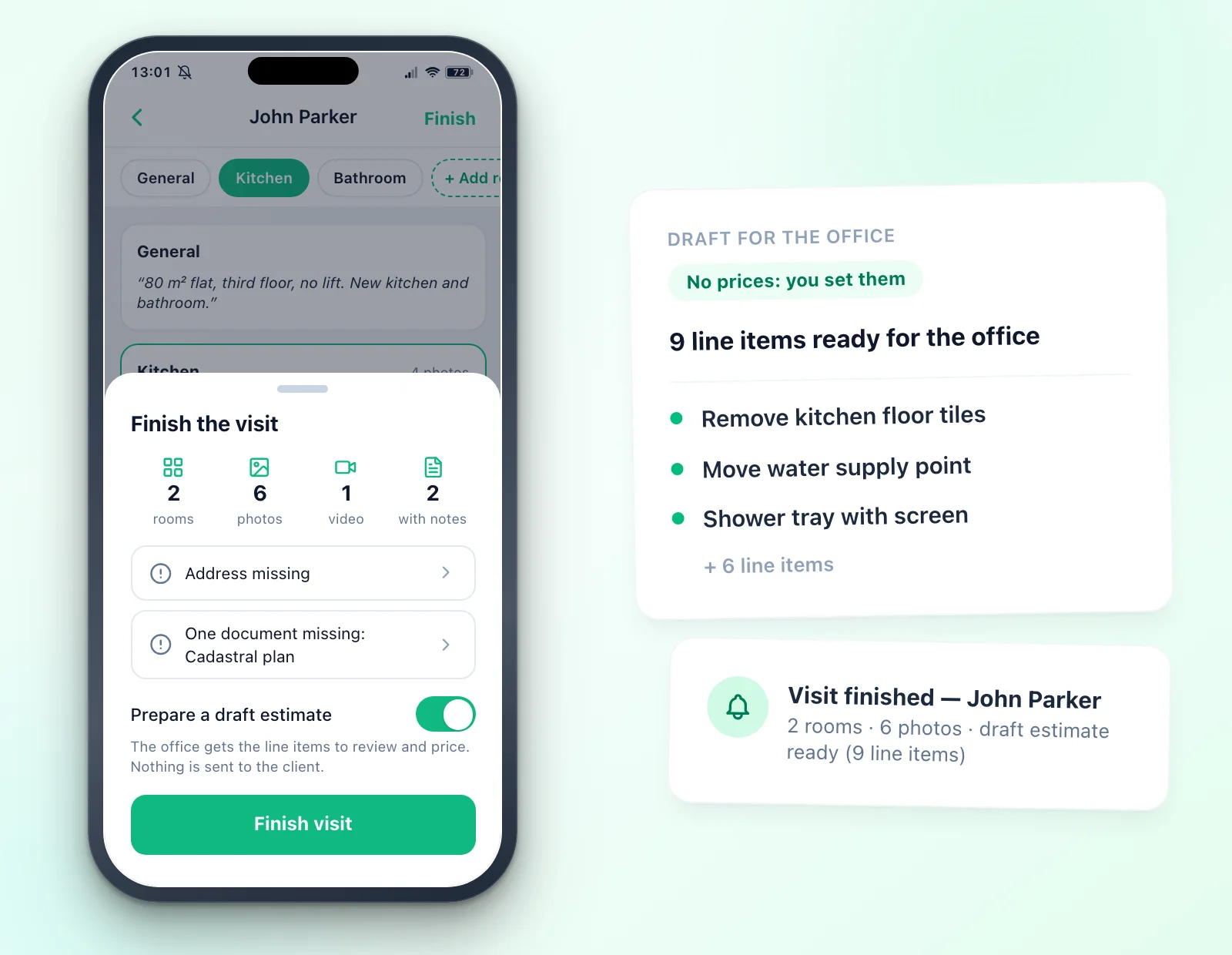
When you leave the house you tap Finish. The app shows a summary of what you captured — rooms, photos, videos — and, as tappable gaps rather than errors, what's missing: "Address missing", the client's phone, documents still needed.
That same summary has a switch, on by default: Prepare a draft estimate. When you confirm, Tabiquo turns the visit into text — the notes, each room with its measurements and note, the checklist answers — and hands it to the same AI estimate generator you already use at the office. The result is a draft estimate saved on the pre-sale project, with its line items and chapters.
Two important things about that draft:
- On the phone you see the line items, never the prices. "9 lines ready for the office", with the list. A figure seen on the doorstep is a figure the client remembers, and the doorstep is no place for a half-considered number.
- You set the prices at the office. When a line matches one of your saved items or your past estimates, the draft proposes your own price; otherwise it stays at zero for you to price. Never a guess dressed up as a price. A brand-new team will price most lines by hand; over time, the draft looks more and more like your own estimates.
Each draft uses one AI action from your plan's monthly allowance. An empty visit costs nothing: with no notes, rooms or answers there's nothing to estimate, and the AI is never called.
At the office: everything in front of you while you price
The notification
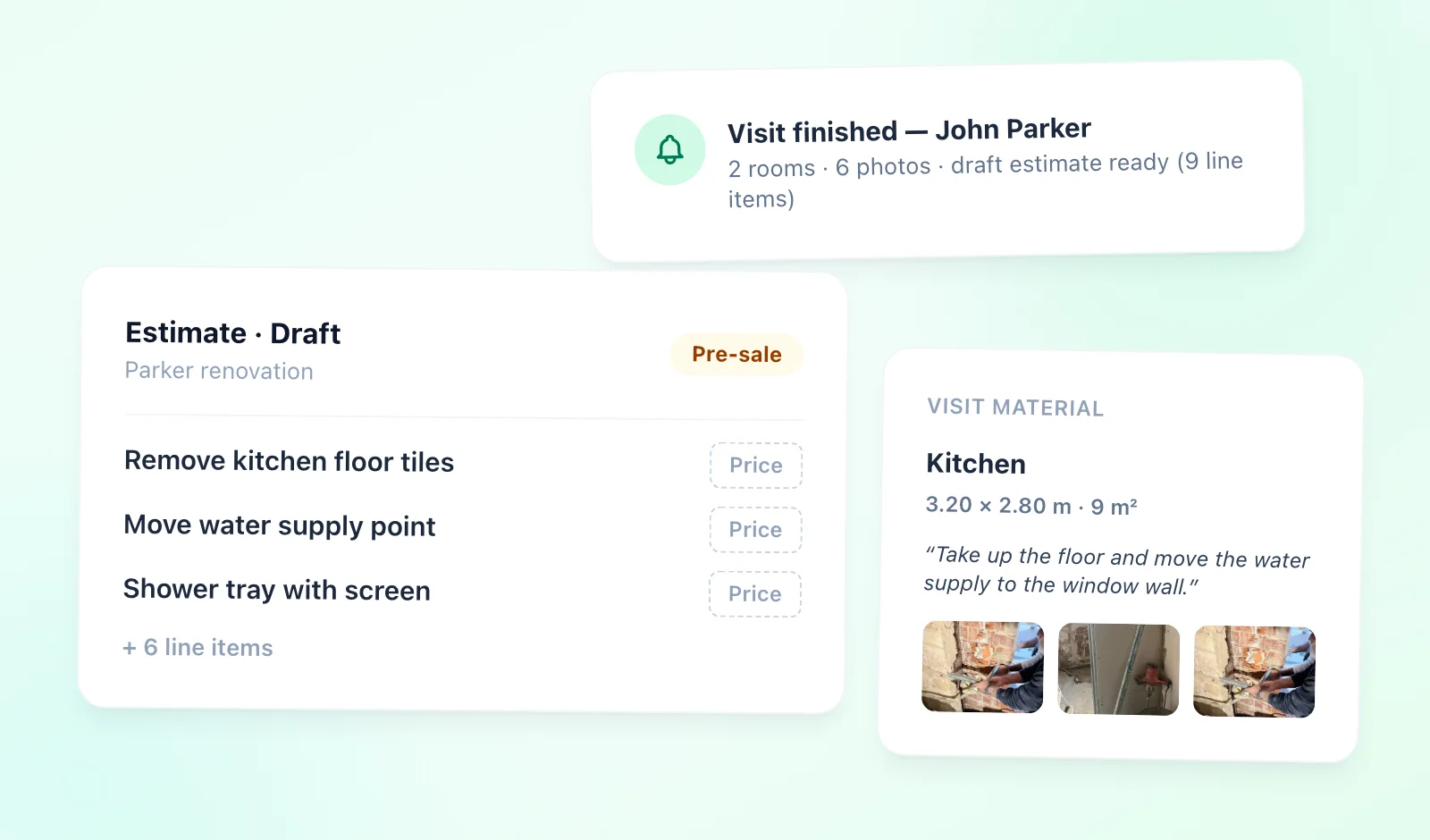
As soon as the visit is finished, the office gets a notification — in the panel's bell, by email and as a phone push, depending on each person's preferences — with the summary: "Visit finished — John Parker · 4 rooms, 23 photos · address missing · draft estimate ready (9 lines)". Admins, managers and back office get it, except whoever did the visit. In a one-person company nothing is sent, which is exactly right.
The visit, readable
On the desktop, the visit reads like it does on the phone: photos grouped by room, with each room's measurements and note. The back-office role — often the person who actually writes the estimates — can open pre-sale visits, because they're the ones who need them most.
The estimate, with the material alongside
When you open the draft, a Visit material panel sits next to the line items: notes, rooms with measurements, photos, without switching screens. Review it, drop what doesn't belong, add what the draft couldn't know, price it, send it.
After a second visit, or if the switch was off, the AI estimate generator has a third source next to free text and a document: Use the visit. Pick the visit and the scope fills itself in. The review step — tick, re-price, apply — is the same, so nothing reaches an estimate without someone looking at it.
If you'd rather start the estimate by hand, Create estimate on the pre-sale project or its visit opens a new one for that project. And when the office takes the call, it can create the visit for an estimate from the projects list too, for whoever is going out to do it.
From pre-sale to project
Pre-sale has its own place
Pre-sale projects have their own tab on the projects list — Projects / Pre-sale / Archived — showing the client, the date of the last visit, the photo count and whether an estimate exists yet. The automated routines that assume a project is under way — the daily site diary, attendance, the setup checklist — skip pre-sale projects.
When the client says yes
The client accepts the estimate from a link, on their phone, without downloading an app or creating an account. At that moment the pre-sale project becomes a live project on its own, carrying everything you captured: rooms, photos, documents, measurements. If the deal was closed over the phone, there's Convert to project.
Until then, the client sees nothing: their users aren't added to the pre-sale project and no project chat is opened. A quote you haven't won yet doesn't show up in their app as if it were a job. They're added on conversion.
When the client says no
Discard archives the pre-sale project. Nothing is deleted: it stays archived with all its material, and if the client comes back in spring, you reopen it.
An honest note on plans: while it's open, a pre-sale project counts as one more project towards your plan's limit; once archived, it no longer counts. That's why discarding the visits that didn't work out is part of the habit.
If the visit is on a project already under way
This article is about the visit before the estimate. Visits during the works — the site supervisor's, with attendees, a checklist, defects and signed minutes — are a different thing, covered in Site visit reports and minutes: what to include and how to finish them before leaving site. What happens to the estimate once accepted — change orders, progress billing — is in Estimates, change orders and progress billing.
Conclusion
The site visit for a quote is the first real contact with a job, and it's almost always handled outside any system. The result is familiar: estimates that go out late, questions that get asked twice, measurements that have to be requested again.
The fix isn't another notebook on your phone. It's a visit that starts with a name, where every photo, measurement and dictated sentence lands in its room the moment it exists, and where the office already has a draft of line items with all the material alongside by the time you leave the house. Reviewing and pricing still takes a while; starting from a blank page no longer does.
For a closer look, the Site visit for a quote page sums it up in three steps. And if you'd rather try it on your next visit, Tabiquo has a 30-day trial with no card required — or book a demo and we'll walk you through a sample visit.